
Advanced Cells Formatting And Coloring In Excel
Build your format and color templates by yourself, and start re-using them in Excel every time you want to color and format cells in Excel. Dose for Excel‘s Cell Format utility can easily create format templates to be used easily with one click.
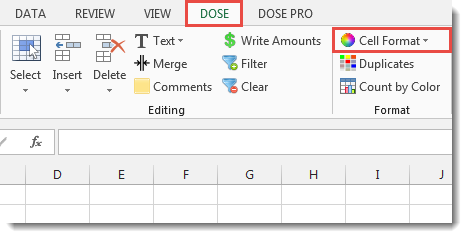
Click DOSE » Format » Cell Format

Usage:
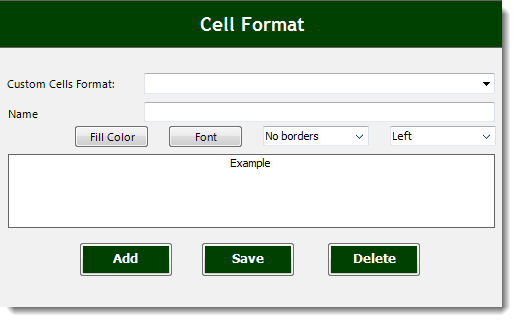
- Click on DOSE » Cell Format to add cell format template.
- Fill the name of the template, back color, font, etc.. and click on “Add” button.
- Select a range of cells.
- And then click on Dose » Cell Format » template button you want. See screenshots:


More Features:
Excel Delete Rows
Excel Highlight Or Delete Any Type Of Rows Highlight or delete items that are identical,…
Excel How to Remove Only Text Or Only Numbers
Remove text or numbers or symbols from cells in Excel You can remove only text…
Excel Remove All Macros
Remove All Macros From Excel Workbooks Delete Macros, User Forms, VBA modules, etc. from Excel…
Excel Fill Blank Cells
Fill Blank Cells In Excel Range Fill blank cells in a range of cells could…
Excel Select Specific Cells
Select Specific Cells In Excel Sheet If you ever want to select some specific cells…
Excel Remove By Position
Remove characters by position from text in Excel If you ever want to remove a…